
Problem
Sometimes you might get the following error while making the API calls to read the data using pagination or for loop in the JSON Source or XML Source or CSV Source or ZS Rest API Tasks/Components.
System.Net.WebException: The remote server returned an error: (429) Too Many Requests. Possible Cause
"429 Too Many Requests" error occurs when you make too many requests to the server within a short period of time, The HTTP status code 429, indicates that you have exceeded the rate limit or usage limits set by the server or API you are accessing.
API providers commonly implement rate limits to prevent abuse, protect server resources, and enforce fair usage policies. These rate limits restrict the number of requests that can be made within a given timeframe. When a client exceeds the rate limit, the server responds with the HTTP status code 429, indicating "Too Many Requests."
Possible Solutions
To resolve this issue, you can consider the following steps:
- Check the API documentation or contact the API provider to understand the specific rate limit policies, including the maximum number of requests allowed within a given timeframe.
-
Slow down the rate of your requests: If you were making multiple requests in a short time span, try spacing them out and reducing the frequency. This will help avoid triggering the rate limit.
To facilitate this, we have implemented a throttling option that allows you to define the desired number of milliseconds to wait before sending the next request. This helps regulate the rate at which requests are made.
Depending on your API Rate Limit, you will need to set the appropriate time interval.
-
Implement backoff logic: When you receive a 429 error, it's advisable to wait for a specific period of time (specified by the server) before making another request. This is known as implementing backoff logic. Retry your request after waiting for the specified duration.
To handle backoff logic, we provide Retry Settings.
To configure the Error Retry settings, follow these steps:
1. Access the connection manager, whether it's HTTP or OAuth.
2. Navigate to the Error Retry Settings Tab.
3. In this tab, you will find the options to configure the Retry settings.
4. Refer to the screenshot below for a visual representation of the configuration.
Make sure to adjust the Retry settings according to your specific requirements and preferences. -
If your package uses a For Loop container or any other repetitive execution pattern, the API may receive requests too quickly, triggering an HTTP 429 – Too Many Requests response.
To avoid this, introduce a short delay between each iteration so the API has enough time to reset its rate-limit counters.You can achieve this by using a Timer Task or Script Task–based delay as documented here:
- How to wait inside package using Timer Task
- How to Delay SSIS Tasks (Timer Task approach)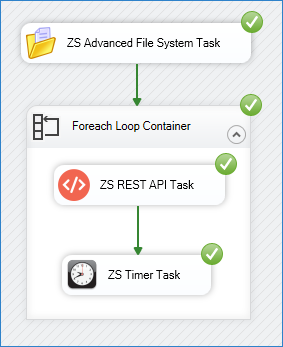
Recommended Approach
- Add the ZappySys Timer Task (or Script Task delay) inside the For Loop.
- Configure a small pause (e.g., 1000–3000 ms) after each API call.
- This helps throttle outbound requests and prevents 429 responses from APIs with strict rate limits.
Using a controlled delay is especially helpful when looping through large datasets, pagination calls, or making back-to-back GET/POST requests.
Contact Us
If you have any further questions, please feel free to contact us via our Live chat or email us at support@zappysys.com. We are here to assist you.
Comments
0 comments
Please sign in to leave a comment.